
Pinterest Downloader: Save Images, Videos & GIFs in HD
Pinterest is full of images, videos, recipes, designs, fashion inspiration, wallpapers, and creative ideas. But saving a Pin for later and downloading it to your device are two different things. Pinterest allows some Pins to be downloaded, but the option isn’t available for every type of content, so you may need a Pinterest Images Downloader tool.
A Pinterest video Downloader makes the pin downloading process simpler. Instead of searching through menus or dealing with unavailable download buttons. You can copy a public Pinterest URL, paste it into the downloader, and save the media directly to your device.

Download Files
Checking Pinterest link...
What is a Pinterest Video Downloader?
A Pinterest Video Downloader is an online tool that processes a Pinterest video URL and provides a downloadable video file when the content is supported. Instead of searching through browser files or trying to record your screen, you can use the Pin link as the starting point.
The downloader identifies the available video and gives you an option to save it. This can be useful when you want to keep your own Pinterest videos, watch a video offline, save a reference for a project, or organize video content you have permission to use.
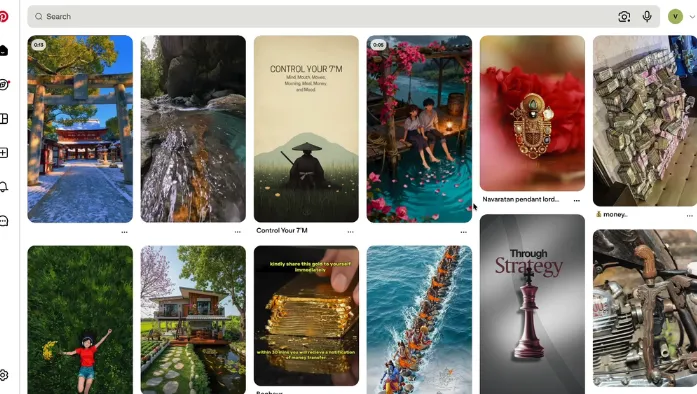
What Can You Download With a Pinterest Video Downloader?
Pinterest contains different types of video content, and availability can depend on how a particular Pin is delivered.
Pinterest Video Pins
Video Pins are one of the main reasons people search for a Pinterest video downloader. They can include recipes, tutorials, workout clips, fashion videos, DIY ideas, product demonstrations, and short creative videos. If the video is publicly accessible and supported by the downloader, you can process its Pinterest URL and save the available video file.
Pinterest Short Videos
Short-form videos are common on Pinterest and can be useful for quick inspiration or reference. A downloader can provide a convenient way to save supported short videos without recording your screen. If you want to save an animated GIF instead, you can use our Pinterest GIF downloader to process the available Pin.
Pinterest Tutorial Videos
Tutorials and how-to videos are often saved for later reference. Downloading a supported video can make it easier to access when you don’t have an internet connection. If the tutorial belongs to another creator, remember that downloading the file does not automatically give you permission to repost or redistribute it.
Your Own Pinterest Videos
A Pinterest video downloader can also be useful for creators who want to keep copies of their own published videos. You may use downloaded copies as backups, move them between devices, or keep a local copy for future editing. Keeping the original video file separately is still recommended because it gives you the highest-quality version.
How to Download Videos From Pinterest
1
Copy the Pinterest Video Link
Open Pinterest and find the video you want to download. Tap or click the Share option and copy the video’s URL.
On a computer, you can also copy the URL directly from the browser’s address bar.
2
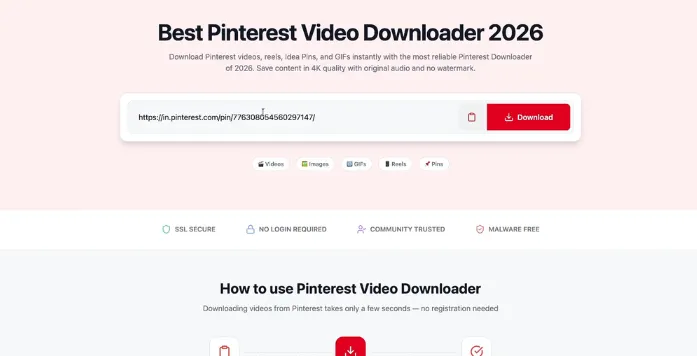
Paste the URL
Open the Pinterest Video Downloader and paste the copied link into the URL field. Make sure the link belongs to the actual video Pin you want to process.
3
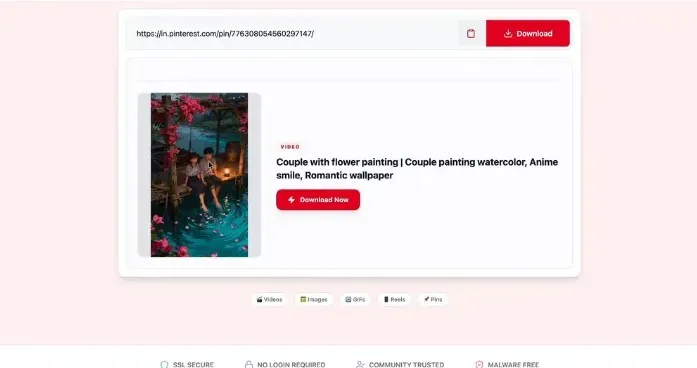
Process the Video
Start the download process. The tool checks the Pinterest URL and looks for the available video media. Processing time can vary depending on the video and connection speed.
4
Download the Video
When the video is ready, select the available download option and save the file to your device. You can then find it in your browser’s download location or the folder selected by your device.
Pinterest Video Downloader on Android
You can download supported Pinterest videos on Android without needing a separate desktop program. Open the Pinterest app, find the video, tap Share, and copy its link. Then open your mobile browser, visit the Pinterest Video Downloader, paste the URL, and start processing.
When the video is ready, tap the download button. Depending on your Android device and browser, the file will usually appear in the Downloads folder or another location selected by the browser.
Pinterest Video Downloader on iPhone
The same basic process works on iPhone and iPad. Copy the Pinterest video URL from the Pinterest app, open Safari, and paste the link into the downloader. After the video has been processed, download the available file.
Depending on your iPhone settings and browser, the video may be stored in the Files app or another download location. If you only want to save the Pin for later, Pinterest’s own Save option may be enough. A video downloader is useful when you specifically need a local video file.
Pinterest Video Downloader for PC
Downloading Pinterest videos on a computer is straightforward. Open Pinterest in Chrome, Edge, Firefox, or another modern browser. Find the video Pin and copy its URL from the address bar or sharing option.
Paste the link into the Pinterest Video Downloader and start processing. Once the video is available, save it to your Downloads folder or another location on your computer. A computer can also make it easier to organize multiple downloaded videos into folders based on projects, topics, or creators.
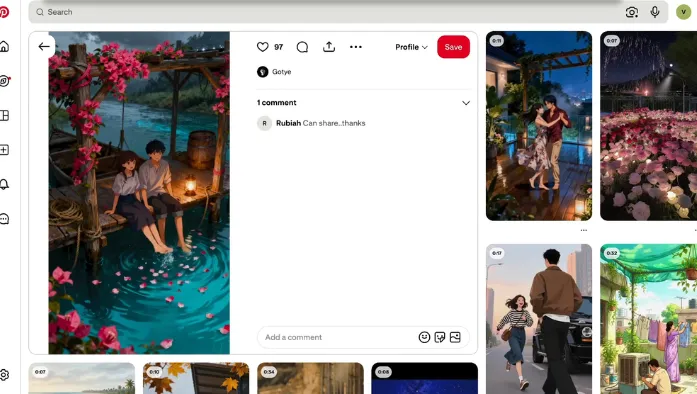
Pinterest Video Downloader vs Pinterest Save
Pinterest’s Save feature and a video downloader serve different purposes. Saving a video keeps the Pin inside your Pinterest account and places it on a board. This is useful when you want to organize videos and return to them later.
Downloading a video creates a local file on your device. You can access that file outside Pinterest and, depending on your device, watch it without opening the Pinterest app.
Why Use a Pinterest Video Downloader?
A browser-based Pinterest Video Downloader can be useful when you need a quick way to save supported video content.
Save Videos for Offline Viewing
A downloaded video can be stored on your device so you can access it without opening Pinterest.
This can be useful when you’re traveling, working without a stable connection, or simply want quick access to a video you’ve saved for personal reference.
No Extra Software
An online downloader works through your browser, so you don’t normally need to install another desktop application just to process a Pinterest video URL. It also makes the process convenient on phones and tablets.
Works Across Devices
You can use a browser-based Pinterest video downloader on Android, iPhone, Windows, Mac, and other devices with a compatible web browser. The exact download location and available options depend on the device and browser.
How to Download Pinterest Videos in Better Quality
The quality of a downloaded video depends heavily on the source media.
A downloader cannot create genuine HD detail if the original video is already low-resolution or has been compressed by the platform. Starting with a high-quality source gives you a better result.
For better results:
- Use the original Pinterest video URL.
- Start with a video that already looks clear and sharp.
- Avoid screen recording when a direct video download is available.
- Don’t repeatedly download, convert, and re-upload the same video.
- Check the downloaded video before using it.
- Keep the original video file when you’re the creator.
This is especially important if you’re saving videos for editing, presentations, personal projects, or future reference.
Why Is My Pinterest Video Download Not Working?
A Pinterest video may fail to download for several reasons.
The Video Link Is Incorrect
Check that you copied the complete URL from the Pinterest video Pin. If you’re unsure, return to the Pin, use the Share option again, and copy the link one more time.
The Video Is Private or Restricted
Publicly accessible videos are generally easier to process. Private, restricted, deleted, or unavailable Pins may not be downloadable. If the video cannot be accessed normally, a downloader may not be able to retrieve it either.
Pinterest Changed How Videos Are Delivered
Pinterest can change the way its pages and media are delivered. These changes may temporarily affect how a downloader processes certain video formats. If one video fails, try another public video to determine whether the problem is specific to that Pin.
The Video Format Is Not Supported
Not every Pinterest video will necessarily be supported. Some Pins may use a format or delivery method that the downloader cannot process. In that situation, there may not be a downloadable file available through the tool.
Does Pinterest Have Its Own Video Download Option?
Pinterest provides download options for some types of content, but availability can vary by Pin and content type. If Pinterest provides a direct download option for the video you’re viewing, you can use it without an external downloader.
When that option isn’t available, a Pinterest Video Downloader can provide a separate URL-based way to process supported public videos. The available options can change depending on the type of Pin, device, and Pinterest features available at the time.
Can You Download Pinterest Images Without an Account?
A Pinterest image downloader may allow you to process a public Pin URL without creating an account on the downloader website. But not every Pinterest Pin will be accessible. Private, removed, restricted, or unavailable Pins cannot be downloaded. You can also download Pinterest content without creating an account when the Pin is publicly accessible.
Can You Download Pinterest Videos Without a Watermark?
This depends on the source video and how the video is provided. A downloader may provide the available video file without adding another watermark during the download process.
However, this does not mean you should remove a creator’s existing watermark, logo, or copyright notice. If a video contains creator branding, keep that information intact unless you have permission to remove or alter it.
Is a Pinterest Video Downloader Free?
Many online Pinterest Video Downloaders provide basic video downloads without requiring a paid subscription.
However, individual services can have different limits. Some may restrict video quality, processing frequency, file formats, or certain types of Pinterest content. Check the downloader’s current options before starting a large number of downloads.
Pinterest Video Downloader for Content Creators
Pinterest creators may use video downloading tools to keep local copies of their own published content. For example, you might want to create a backup of videos you’ve posted, move a video to another device, or keep a copy available for future editing.
The original video file should still be your primary backup. A downloaded Pinterest version may have different quality or compression compared with the file you originally uploaded.
Can You Download Pinterest Images in HD?
You can download a high-resolution version when the source provides one.
But Pinterest may display or serve a version that has already been resized or compressed. A downloader can retrieve available media, but it cannot restore missing pixels or recreate the original camera file.
For the best quality, always start with a high-resolution Pin.
Pinterest Video Downloader for Designers and Researchers
Pinterest is widely used for visual research, and videos can provide more information than static references. Designers, marketers, students, content creators, and researchers may save video references to study presentation styles, tutorials, product demonstrations, editing ideas, or creative concepts.
If you’re collecting videos for a project, organize them into folders and use descriptive filenames. For example: kitchen-design-video-ideas.mp4 is easier to identify later than: video123.mp4
Respect Copyright When Downloading Pinterest Videos
Downloading a Pinterest video does not transfer ownership of the content. If the video belongs to another creator, check the creator’s usage terms before reposting, editing, selling, or using it commercially.
For commercial projects, use content you have the appropriate rights or permission to use. If you’re downloading videos simply as personal references, keep that purpose separate from publishing the content elsewhere.
Frequently Asked Questions
Conclusion
A Pinterest Video Downloader provides a simple way to save supported Pinterest videos as local files. The basic process is straightforward: copy the video Pin URL, paste it into the downloader, process the link, and save the available video.
The result depends on the source video, its accessibility, and the quality provided by Pinterest. For the best results, use a public video with good source quality and check the downloaded file before using it.