
Pinterest GIF Downloader
Pinterest is full of fun and useful GIFs for reactions, memes, ideas, tutorials, and social media posts. Sometimes you find a GIF you want to save on your phone or computer, but Pinterest doesn’t always allow you to download it.
A Pinterest GIF Downloader helps you save GIF content from Pinterest by using the link to the Pin. You don’t need to spend time searching for the same GIF again. Just copy the Pinterest link, add it to the downloader, and save the available GIF file to your device.
Download Files
Checking Pinterest link...
What Is a Pinterest GIF Downloader?
A Pinterest GIF Downloader is an online tool that lets you download GIFs from Pinterest using a Pin URL. Instead of manually finding the original file, you can provide the Pinterest link, and the tool can process the content and make it downloadable.
It works directly in a web browser, like our main Pinterest video downloader. That means you can use it on a phone, tablet, laptop, or desktop without installing any additional software.
How to Download a GIF from Pinterest?
Downloading a Pinterest GIF usually takes only a few steps once you know how to save a GIF from Pinterest in its original format.
1
Find the GIF on Pinterest
Open Pinterest and search for the GIF you want to save. When you find the right Pin, open it so you can access its link. Make sure you select the correct Pin before copying the URL. This helps the downloader identify the content you are trying to save.
1
Copy the Pinterest Link
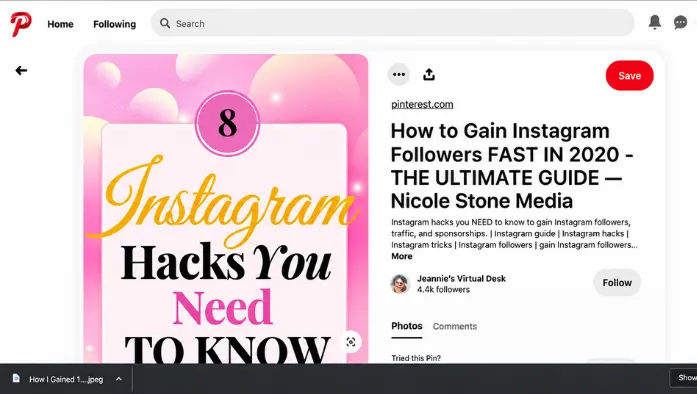
Tap or click the share option on the Pin and copy its link. On a computer, you can also copy the URL directly from your browser’s address bar. You only need the Pinterest Pin link. There is normally no need to download extra software just to copy the URL.
1
Paste the Link
Open the Pinterest GIF Downloader and paste the copied link into the input field. Check that the complete URL has been added before continuing.
1
Download the GIF
Click the download button provided by the GIF downloader. The tool will process the link and, if the content is available, provide an option to save the GIF. After downloading, check your device’s downloads folder or gallery to find the saved file.
Can You Download Pinterest GIFs on a Phone?
A Pinterest GIF Downloader works on most smartphones as long as you have an internet connection. The basic process is the same on Android and iPhone. Open Pinterest, copy the Pin link, open the downloader in your mobile browser, paste the link, and download the available file.
On some phones, downloaded files may appear in the browser’s Downloads folder instead of your photo gallery. If you don’t see the GIF immediately, check your device’s file manager or downloads section.
Can You Download Pinterest GIFs Without an Account?
In some cases, you can use a Pinterest GIF downloader without creating an account on the Pin. The main requirement is usually the Pinterest URL.
Because access to a specific Pin can depend on Pinterest and the content itself. If a Pin is private, restricted, removed, or otherwise unavailable, a downloader may not be able to process it. You should also avoid entering your Pinterest password into any downloader website. A downloader should not need your account password to process a public Pin link.
Why Download Pinterest GIFs?
There are several practical reasons people save GIFs from Pinterest.
Offline access: Once a GIF is saved, you don’t need to search Pinterest every time you want to view it.
Easy sharing: A saved file can be easier to organize or use on supported platforms and apps.
Content collection: If you use GIFs for creative projects, you can keep useful files together on your device.
Quick access: Downloading a GIF saves you from scrolling through Pinterest to find the same Pin again.
Is It Safe to Download GIFs from Pinterest?
The safety of a downloader depends on the website you use and the file it provides. You should be careful when using any other downloading service.
Avoid websites that ask for your Pinterest login details, install unknown applications, or request unnecessary browser permissions. Don’t open files that look suspicious or have an unexpected format.
What Can You Use a Downloaded GIF For?
A downloaded GIF can be useful for personal collections, offline viewing, or projects where you have permission to use the content. If the Pin is a static picture instead of an animation, you will need to use our Pinterest Images Downloader instead.
For example, you want to save a reaction GIF, animation, educational clip, or visual idea for later. If you plan to post the GIF somewhere else, check who owns the content and whether reuse is allowed.
Common Problems When Downloading Pinterest GIFs
Sometimes a Pinterest GIF may not download correctly. A few simple checks can help to resolve issues.
The link doesn’t work
Make sure you copied the complete Pinterest Pin URL and try again.
The GIF cannot be found
The Pin may have been removed, made private, or become unavailable.
The download button doesn’t respond
Refresh the page and try the process again. You can also check whether your browser is blocking a required action.
The file won’t open
Check the downloaded file and make sure it has a format supported by your device or app.
Frequently Asked Questions
Conclusion
A Pinterest GIF Downloader gives you a simple way to save GIFs from Pinterest using a public Pin URL. The process is quick: find the GIF, copy its URL, paste it into the downloader, and save the available file.
You don’t need to install unknown software. Just use a browser-based service, protect your account details, and respect the rights of the people who created the content on Pinterest.