Why People Save Pinterest Videos for Recipes & DIY Projects (And How to Keep Them Handy)
You’re standing in the kitchen, hands covered in flour, trying to remember the exact folding technique from that Pinterest video you watched yesterday. Except now you can’t find it, your Wi-Fi is spotty, and the app keeps buffering at the worst possible moment.
This is exactly why so many people save Pinterest videos before they even start cooking or building. Having the video ready and waiting, instead of hoping it loads at the right moment, changes the entire experience.
The Real Problem With Relying on Live Pinterest Videos
Pinterest works great for browsing and discovering ideas. It works a lot less great when you’re mid-project and actually need that content to perform reliably.
Kitchens and Workshops Aren’t Wi-Fi Friendly
Kitchens sit far from routers more often than you’d think, and garages or workshops usually fare even worse. A weak signal turns a simple recipe video into a frustrating loop of buffering and pausing.
Scrolling Interrupts the Flow
Every time you unlock your phone to find that saved pin again, you lose momentum. Sticky dough doesn’t wait patiently while you scroll through your boards looking for the right video.
Pins Disappear More Often Than You’d Expect
Creators delete content, accounts go private, and pins vanish without warning. That video you were counting on for tonight’s dinner might simply not be there anymore.
Why People Save Pinterest Videos for Recipes Specifically
Cooking videos are some of the most commonly saved content on the entire platform, and the reasons make a lot of sense once you think about it.
You Need Both Hands Free
Recipes often require watching a technique while your hands are busy mixing, chopping, or kneading. A saved video that plays instantly, without loading delays, keeps your rhythm intact.
Timing Matters More Than You Think
Some recipes depend on precise timing between steps. If your video freezes right when you need to check how long to knead dough or how thick to pour batter, the whole result can suffer.
You Often Return to the Same Recipes
Nobody makes a favorite recipe just once. Saving the video means you’re not hunting for the same pin every single time you want to cook it again.
Why People Save Pinterest Videos for DIY Projects
DIY content shares a lot of the same challenges as recipes, with a few extra complications thrown in.
Projects Take Longer Than a Single Sitting
Unlike a 20-minute recipe, many DIY projects stretch across hours or even days. You need the reference video available at every stage, not just the first time you watch it.
Workshops and Garages Have Worse Signal Than Kitchens
Concrete walls, metal tools, and detached garages all interfere with Wi-Fi and cellular signal. A saved video sidesteps this problem entirely.
Mistakes Are Costly
Cutting the wrong measurement or missing a step in a furniture build isn’t as forgiving as a slightly overcooked dinner. Having the video ready to pause, rewind, and rewatch reduces expensive mistakes.
The Difference Between Saving a Pin and Saving a Video
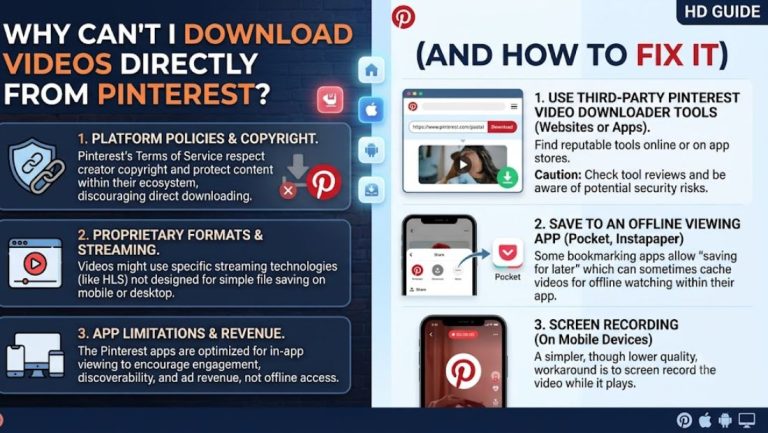
This distinction trips a lot of people up. Saving a pin to a Pinterest board keeps a reference inside the app, but it doesn’t give you an actual file you can open offline.
Pinterest Downloads work differently. When you actually save Pinterest videos as real files, you get something that plays instantly, works without signal, and stays available even if the original pin gets deleted later.
Think of the difference this way:
- Saving a pin bookmarks the content inside Pinterest, still dependent on an internet connection
- Downloading the video gives you an independent file that works anywhere, anytime
For anything you plan to actually use hands-on, downloading beats bookmarking every time.
How to Keep Your Saved Videos Organized and Handy
Once you start building a collection of downloaded recipes and DIY tutorials, a little organization goes a long way.
Create Separate Folders by Category
Split your downloads into folders like “Baking,” “Dinner Recipes,” or “Furniture Projects.” This makes finding the right video far faster than scrolling through one giant camera roll.
Rename Files With Something Memorable
A file named “Video047.mp4” tells you nothing. Renaming it to “Sourdough Folding Technique” saves you from guessing later.
Use Cloud Storage for Backup
Keeping a backup copy on Google Drive or Dropbox protects your collection if your phone gets lost, damaged, or replaced. It also means you can access your saved videos from any device.
Star or Favorite Your Most-Used Videos
If your storage app supports favoriting or pinning files, use it for the recipes and projects you return to constantly. This keeps your most valuable content just one tap away.
Practical Situations Where Saved Videos Make the Biggest Difference
A few everyday scenarios show exactly why downloading beats relying on a live connection.
Cooking during a power outage or spotty rural internet. Your saved video plays regardless of what your connection is doing.
Working in a basement workshop with zero signal. Downloaded content doesn’t care whether your phone shows one bar or five.
Traveling and cooking in an unfamiliar kitchen. You bring your favorite recipes with you, without depending on someone else’s Wi-Fi password.
Teaching a technique to someone else in person. Pulling up an instant, ready-to-play video beats fumbling through an app while someone waits.
What to Look for in a Video Downloading Tool
If you’re going to start building a library of saved recipes and DIY tutorials, the tool you use for downloading matters. A few features separate a genuinely useful downloader from a frustrating one.
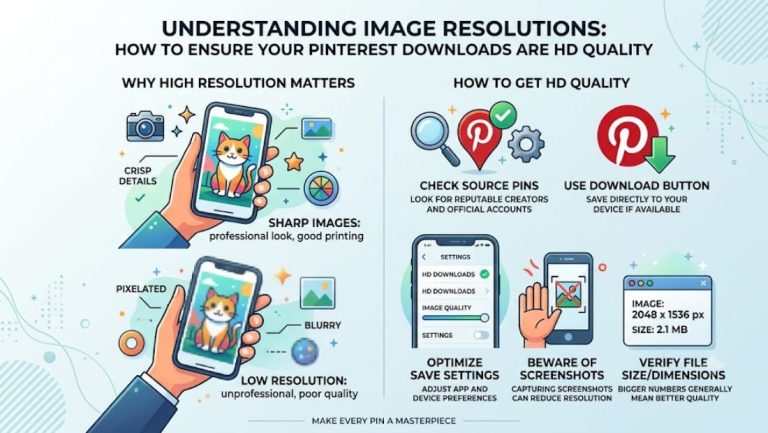
Original quality matters. A blurry, compressed video defeats the purpose if you can’t clearly see a knife technique or a joinery detail. Look for a tool that pulls the source file rather than a screen-recorded copy.
Speed counts when you’re mid-project. Standing around waiting for a slow download while butter melts on the stove isn’t ideal. A fast, straightforward process keeps you moving instead of stuck refreshing a page.
No unnecessary sign-ups. You shouldn’t need to create an account just to save a cooking video for tonight’s dinner. The simpler the process, the more likely you’ll actually use it consistently.
Works reliably across devices. Since you might download something on your phone in the kitchen and later organize it on a laptop, cross-device compatibility saves you extra steps.
Getting these basics right turns downloading from an occasional workaround into a habit that genuinely fits your cooking and building routine.
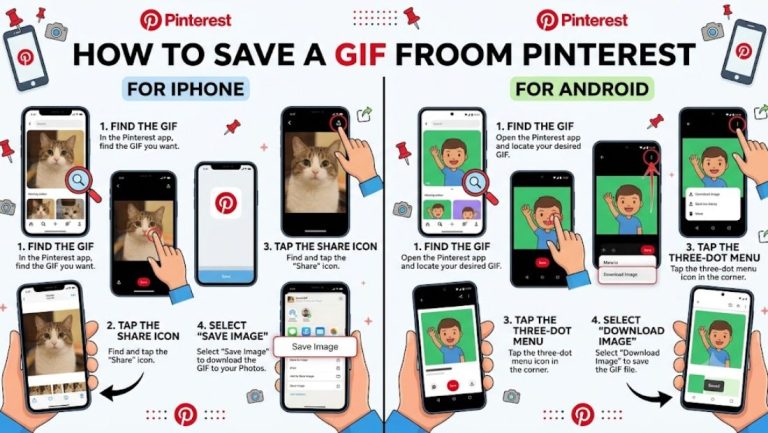
If you want to download Pinterest Videos, Image or GiF then use Pinclipper.
Final Thoughts
People save Pinterest videos for recipes and DIY projects because live streaming from the app simply isn’t built for hands-on, real-world use. Buffering, disappearing pins, and unreliable signal all get in the way at exactly the wrong moment.
Once you start treating your favorite tutorials as files worth keeping rather than pins worth bookmarking, cooking and building both get noticeably smoother. A little organization afterward turns your downloads into a reliable, ready-to-use library you can count on every single time.
What is Pinterest Downloader: How It Works, and When to Use One